
Every ABA practice eventually meets the same quiet gap. The schedule is full, the authorization has units, the eligibility record confirms coverage, the session has been performed, the note has been signed, the claim has been submitted, and the payer has paid its share. What is left is the part of the visit the payer did not cover — the deductible, the coinsurance, the copay, the secondary portion the family owes — and that portion is now the family's responsibility to pay. The revenue cycle is complete when the practice collects it. The revenue cycle is broken when the family does not know what they owe, the practice cannot reconcile what arrived, or the biller is maintaining a side spreadsheet that drifts out of sync by the end of the quarter.
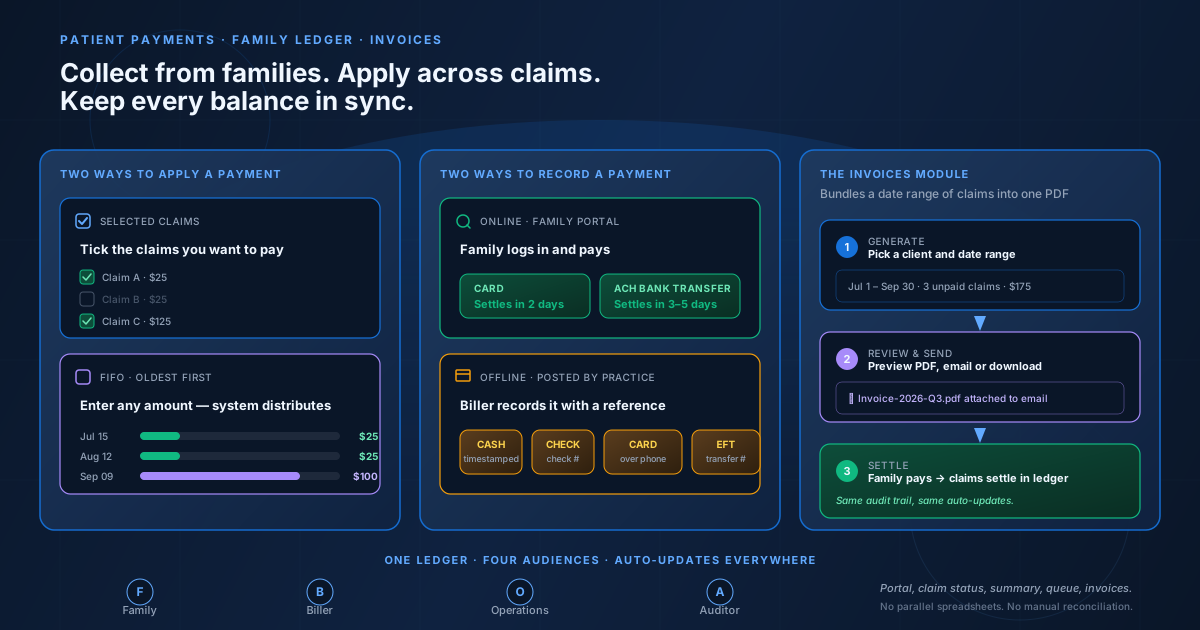
Cognix Health closes that gap with four connected pieces of the patient payments workflow:
- The family ledger, the single record every audience reads — the family, the biller, the operations lead, and the auditor all look at the same columns.
- Two ways to apply a payment across claims: the family or biller can pay a specific set of claims they pick, or they can pay a custom amount that the system distributes oldest service date first.
- Two ways to record a payment: the family can pay online through the portal, or the practice can post a payment the family made offline (cash, check, card over the phone, or bank transfer).
- The invoices module, which lets the practice bundle a date range of unpaid claims into a PDF invoice the family can pay against or the practice can send by email.
Every piece auto-updates the rest. When a payment lands, the family's portal, each affected claim's status, the practice's ledger summary, and the biller's work queue all reflect the new balance — without the biller re-keying a number. This post walks through each piece in turn, with worked examples.
What the Family Ledger Is For
The family ledger is the financial record of every claim a practice has billed against a family. Where the Claims page is a work queue — which claims need submitting, which need correcting — the ledger is the account. It shows what was charged on each visit, what the payer paid, what the family owes, what the family has already paid, and what is still outstanding.
The ledger has to answer questions for four audiences at once. The family needs to know what they owe and how to pay it. The biller needs to know which families have an outstanding balance and which claims are partially paid. The operations lead needs to know the total receivables across the caseload and the breakdown by payment source. The auditor needs the same numbers in a form that reconciles back to the bank statement. The ledger is the single record all four audiences read, and the columns they read are the same columns — date, service, charge, payer-paid, responsibility, paid, outstanding — interpreted through four different lenses.
Two Ways to Apply a Payment: Selected Claims or FIFO
Inside the ledger, the same payment can be applied two different ways. The mode the family or the biller picks changes how the system walks the claims.
Selected claims is the mode the family uses when they are settling a specific visit — they tick the one claim with an outstanding balance, the system reads the full outstanding amount for that claim, and that is the amount they pay. The biller uses the same mode when posting an offline payment the family made on a specific visit.
FIFO is the mode the family uses when they want to pay what they can afford. The family enters a custom dollar amount — anything up to the total outstanding — and the system walks the claims oldest service date first, applying each claim's full outstanding balance before moving to the next. A family paying $300 against a $1,000 ledger with four claims will see the oldest claims settled and a remainder the family can pay later. The biller can use FIFO for the same purpose when posting a partial offline payment.
FIFO matters because every other order creates a different kind of dispute. Paying newest first means the family can clear the latest claim while older claims stay outstanding — the practice would have to chase those older claims later, often after the family's coverage has lapsed. Paying largest first means the family can settle the highest-dollar claim while smaller claims sit open — the practice would have a portfolio of small receivables that are individually too small to chase but collectively too large to write off. FIFO avoids both failure modes: the family's dollars go to the oldest outstanding claim first, regardless of preference, and the result is an allocation every ABA billing operation can defend at audit.
A claim with no patient responsibility (the payer covered the full amount) is naturally skipped — there is nothing for the family's dollars to apply to. A claim the family has already paid in full is also skipped. The distribution only touches claims with a positive outstanding balance.
Two Ways to Record a Payment: Online Portal or Offline Posting
Payments enter the ledger through one of two entry points. The choice between them is who is sitting at the keyboard when the payment happens.
Both entry points post to the same ledger and trigger the same downstream updates. The difference is the reference number: an online payment carries the processor's transaction reference, while an offline payment carries the check number, the biller's timestamped cash reference, or the bank's transfer reference. The audit trail treats both the same way — one payment, one reference number, one set of ledger entries per claim that received money.
The four offline methods exist because no single payment method covers every family. Some families pay cash at the front desk before they leave. Some families mail a check that arrives a week later. Some families call and give their card over the phone. Some families set up a bank transfer from their own bank's bill-pay. The practice posts each one the same way through the same form.
How Online Payments Flow Through the Ledger
When a family pays through the portal, the payment lands on the ledger end to end without the biller touching a single field. The family sees the claims they owe against, chooses what to pay, and submits. The system records the payment, applies it across the family's open claims in the chosen mode, updates each claim's status, refreshes the family's outstanding balance, refreshes the practice's ledger summary, and refreshes any work queue that depends on the new balance. Every screen the family, the biller, the operations lead, or the auditor opens is up to date by the time they open it.
The portal handles both application modes from the same screen. The family picks which mode they want before submitting: a checkbox-list of claims (selected mode) or a custom dollar amount field (FIFO mode). Either choice results in a single payment with a single processor reference, applied across the appropriate claims.
The payment methods on the portal are Card and ACH bank transfer. Both flow through the same online payment infrastructure, both produce the same kind of ledger entry, and both feed the same reconciliation flow. The differences — fee math, settlement time, failure mode — are operational concerns for the practice's finance lead, not behavior the family sees in the ledger.
How Offline Payments Are Posted
When the family pays offline, the biller posts the payment through the practice's ledger form. The form opens the same claims grid the family would see, but it lets the biller enter the payment method, the reference number, the date, and the amount directly. The biller can use either mode: tick the claims the family is paying (selected), or enter a single amount and let the system distribute it FIFO.
A typical week produces a mix of both entry points. A Monday morning visit yields a Card payment the family makes through the portal before they leave the waiting room. A Wednesday mail delivery yields a Check the biller posts against the family's September claims. A Friday phone call yields a Card the family dictated over the phone. Each posts to the same ledger, gets the same audit-trail treatment, and updates the same downstream views.
The reference number is the single most important field on an offline payment. A check payment carries the check number. A cash payment carries a timestamped reference the biller enters at posting time. A posted Card or EFT payment carries the bank's authorization reference. The reference is what ties the ledger entry back to the bank statement and what the biller uses to reconcile the deposit against the ledger row.
How the System Applies a Payment Across Claims
Whether the payment enters through the portal or through the practice's posting form, the application logic is the same. The family or biller chooses a mode, and the system walks the open claims in that mode's order.
For selected claims, the system reads the claims the family or biller ticked, calculates each claim's outstanding balance (responsibility minus what has already been paid), and applies that outstanding amount to each claim. A claim that is already fully paid is silently skipped because there is nothing to apply to. A claim with a partial balance receives the partial amount needed to clear it.
For FIFO, the system reads every open claim with a positive outstanding balance, sorts them by service date ascending, and walks the list oldest first. The payment is applied to the oldest claim's full outstanding balance, then the next oldest, until the payment runs out. Any remainder is left unapplied and visible to the family on the portal and to the biller in the ledger.
In both modes, the result is a batch of ledger entries — one entry per claim that received money, each carrying the same reference number, each recording the amount applied and the balance left after the payment. The biller can read the entries in reference-number order and reconstruct exactly which claim received which dollar of a single payment.
How Everything Stays in Sync
The whole point of building the patient ledger into Cognix Health is that the practice does not have to keep it in sync by hand. When a payment lands, the system updates every place the new balance should appear:
- The family's portal reflects the new outstanding balance within minutes.
- Each claim's record shows the amount paid and the remaining balance.
- The ledger summary aggregates the change into the practice-wide totals.
- The biller's work queue surfaces the families and claims that still need follow-up.
- The operations lead's reports reflect the updated receivables total.
- Any outstanding invoice for the family is recalculated against the new balance.
The same auto-update happens on the other side of the ledger when a payer remittance posts. The claim's responsibility is recalculated, the claim's write-off is set, and the family balance that depends on that responsibility is refreshed — without the biller re-keying any number. The ledger stays consistent because every number on it is derived from the same underlying records, and every record has one source of truth.
The result is that the biller's Monday morning is spent following up on outstanding balances, not reconciling a side spreadsheet against the system. The family can read their portal and trust what they see. The operations lead can read the practice-wide totals and trust what they see. The auditor can read the audit trail and trust what they see.
The Invoices Module — Bundling Claims into a Family Invoice
The ledger answers the question "what does this family owe, claim by claim?" The invoices module answers a different question: "what does this family owe for a date range of unpaid claims, presented as one document they can read and pay?"
The invoices module sits alongside the ledger in the practice's dashboard. It serves two distinct audiences inside the practice: the biller, who uses it to send a clean PDF to a family that prefers an itemized bill over a portal login, and the operations lead, who uses it to clear out a batch of small unpaid claims that have aged past the point of chasing them one by one.
The flow has three steps:
The invoice PDF shows the practice as the biller, the family as the recipient, the invoice number, the date range, and the line-item claims with their outstanding balances and the total. When the family pays the invoice, the payment is applied to the exact set of claims the invoice bundled — the system reads the claims the invoice covered and creates one ledger entry per claim that received money, just as if the biller had ticked those claims in the ledger form directly.
The invoices module does not replace the ledger; it sits on top of it. A claim that has been paid through the ledger is excluded from any future invoice the practice generates for that family, because the invoice pulls claims with outstanding responsibility only. A claim that has been included in a sent invoice is locked out of any other invoice until the existing one is paid or voided, so the practice never double-bills a family for the same claim.
Worked Example — One Family, Three Claims, Three Payment Paths
To make this concrete, here is the same family on the same three claims, paid three different ways.
The family. Three claims on their ledger from the last quarter:
| Claim | Service Date | Payer Paid | Family Responsibility | Status |
|---|---|---|---|---|
| Claim A | Jul 15 | $150 | $25 | Unpaid |
| Claim B | Aug 12 | $150 | $25 | Unpaid |
| Claim C | Sep 09 | $175 | $125 | Unpaid |
The family owes $175 across the three claims.
Example 1 — Online payment, FIFO mode
The family logs into the portal and decides to pay $200 — what they can afford this month. They choose FIFO mode and enter $200.
The system reads the three open claims, sorts them oldest first (Claim A → Claim B → Claim C), and walks the list:
- Claim A has a $25 outstanding. The system applies $25. Claim A is settled. Remaining: $175.
- Claim B has a $25 outstanding. The system applies $25. Claim B is settled. Remaining: $150.
- Claim C has a $125 outstanding. The system applies $125. Claim C is settled. Remaining: $25.
The full $200 is applied across all three claims — $25 to Claim A, $25 to Claim B, $125 to Claim C, $25 unapplied. The family can see the unapplied $25 on their portal as a credit toward next month.
Example 2 — Online payment, selected-claims mode
The same family, a different month, has $25 of credit from the previous partial payment. They decide to settle Claim C in full this month. They tick Claim C in the portal and submit.
The system reads Claim C's outstanding balance ($125), produces a payment intent for $125, and the family pays through the portal. Claim C is settled. The family's portal shows a $0 outstanding balance across all three claims.
Example 3 — Offline payment, posted by the biller
The family calls the practice and pays $50 by Card over the phone. The biller opens the family in the ledger, ticks Claim A, and posts a $50 offline Card payment.
The system reads Claim A's outstanding balance, applies the $50 payment (which covers the $25 responsibility plus $25 toward Claim B's responsibility in FIFO order, since the biller used a single $50 amount rather than ticking a second claim), and the family's portal reflects the new balance within minutes.
Example 4 — Invoice-settled payment
The family prefers a paper bill. The practice generates an invoice covering Claims A, B, and C for the July–September date range, sends the PDF by email, and the family pays the $175 invoice total through the link in the email. The system reads the three claims the invoice covered and creates one ledger entry per claim — $25 to Claim A, $25 to Claim B, $125 to Claim C. All three claims settle in the same order as the FIFO example, but the family paid against an invoice rather than against the ledger directly.
The audit trail is the same in all four examples: one payment, one reference number, one set of ledger entries per claim that received money.
Best Practices
A few habits keep the family ledger working well as the practice grows:
- Encourage families to use the portal. The portal is where the ledger and the family's understanding of the ledger stay in sync. A family paying by check or phone creates a manual entry the biller has to post; a family paying through the portal creates the entry automatically.
- Always capture a reference number on offline payments. The check number, the bank transfer reference, or the biller's timestamped cash note is the only field that ties the ledger row to the bank deposit. A missing reference makes reconciliation impossible.
- Use FIFO when the family is paying what they can afford. The distribution handles allocation fairly and produces an audit trail the biller can read later.
- Use selected-claims when the family names a specific visit. The family or biller picks the claims, the system fills them, and the audit trail shows zero unapplied remainder.
- Use the invoices module when the family prefers a single document. The invoice bundles a date range into a PDF the family can pay against, with the same ledger behavior as a direct payment.
- Read the ledger summary weekly. A weekly glance catches the patterns a monthly glance misses: a payment that was returned, a remittance that changed every claim's write-off, an installment payment that left an unapplied remainder.
Want to see how the patient payments workflow fits your practice? Contact Cognix Health to schedule a demo.
Frequently Asked Questions
What payment methods can a family use?
On the portal, families can pay by Card or ACH bank transfer. For offline payments the practice posts on the family's behalf, the biller records Cash, Check, Credit/Debit Card, or EFT/ACH and enters the appropriate reference number.
What is the difference between selected-claims mode and FIFO mode?
Selected-claims mode lets the family or biller tick the exact claims they want to pay; each ticked claim receives its full outstanding balance. FIFO mode lets the family enter any dollar amount up to the total outstanding; the system distributes it oldest service date first, filling each claim before moving to the next.
Can the practice post a payment the family made offline?
Yes. The practice's ledger form accepts Cash, Check, Credit/Debit Card, and EFT/ACH entries, with a reference number for each. The posting behaves the same as an online payment for downstream updates.
What does the family see on their portal?
The family sees a list of every claim on their ledger, the amount they owe on each, and a running total of what is still outstanding. They can pick specific claims to pay (selected mode) or enter a custom amount to apply FIFO.
What is the invoices module and when should we use it?
The invoices module bundles a date range of unpaid claims into a single PDF. It is useful when a family prefers a paper bill over a portal login, or when the operations lead wants to clear out a batch of small unpaid claims that have aged past the point of chasing them one by one.
How does the ledger interact with the claim lifecycle?
The ledger reads the latest remittance per claim to compute its balances, and the claim lifecycle writes a new remittance every time the payer responds. When a remittance arrives, the claim's responsibility is recalculated, the family's balance is refreshed, and every screen that depends on the balance updates automatically.
Does a claim included in an invoice get paid through the ledger when the family pays the invoice?
Yes. When the family pays an invoice, the system reads the claims the invoice covered and creates one ledger entry per claim that received money, just as if the biller had ticked those claims directly. The ledger and the invoice stay in sync.
What happens when a payment is returned or reversed?
The original entry is reversed, the family's balance is restored, and the system shows the original payment and the reversal as a pair so the biller can see both. The operations lead follows up with the family to collect a new payment.
This post was prepared by the Cognix Health team. The patient ledger, payment methods, FIFO and selected-claims modes, and invoices module described here reflect the behavior of the Cognix Health patient payments workflow. For questions about how this fits your practice, reach the team at admin@cognixhealth.com.